Friday, March 5, 2021

Observer x++ D365FO

 Observer

Observer pattern is used when there is one-to-many relationship between objects such as if one object is modified. Its dependent objects are to be notified automatically.

Most common example for observer is Display methods.

Example: 1

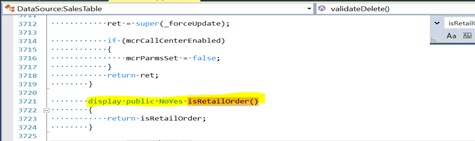
Object: SalesTable (form)


Form Display method

Based on mentioned in FORMOBSERVABLE attribute to global declared variables, System keep on observer any changes on this. In case if any changes then it will trigger logic wherever its called on display methods.

Example: 2

Object: ReturnReplaceItem(form)


Based on mentioned in _ds.observer() for data source, System keep on observer any changes on Ds object. In case if any changes then it will trigger logic wherever it’s called on display methods.

Example: 3

Object: PurchTable (Form)


We can say to system like as calling markChanged() action is mentioned, whenever it gets changed in case variables wherever workflowIconObservableLink.observe() is called system will refresh automatically.


Friday, January 22, 2021

How to Use the Table Browser in D365FO using Chrome add-ins

 Install chrome extension for table browser


Add and do config as per req


Note: table & data entity also will work.

AOT Browser in D365FO

 Reference: https://dynamics-tips.com/aot-browser-d365-finance-and-operations/  


GitHub:

https://github.com/arbelatech/aotbrowser

Thursday, January 21, 2021

Insert table data from one DB to another DB SQL script

 Insert table data from one DB to another DB SQL script


SQL 1:

INSERT INTO <Target DB>.dbo.<Table Name>

SELECT *

FROM <Source DB>.dbo.<Table Name>

where <Source DB>.dbo.<Table Name>.<Table field name>= '<values>'


SQL 2:

INSERT INTO [target db].[dbo].[table] (<columnA>,<columnB>,…)

SELECT <columnA>,<columnB>,…

FROM [source db].[dbo].[table] 


Tuesday, November 24, 2020

Build model through command line

Reference: (source) -> https://www.theaxapta.com/2020/11/build-model-through-command-line.html 

Get List of all workspace

tf.exe workspaces /owner:* /computer:{Workspace} /collection:https://{TFS}.visualstudio.com

Delete a workspace

tf workspace /server:https://{TFS}.visualstudio.com/defaultcollection /delete "{Workspace};{Owner}"

You need to out email id of the owner, user id will not work.

compile model

C:\AosService\PackagesLocalDirectory\Bin\Xppc.exe -verbose -apixref -metadata=C:\AosService\PackagesLocalDirectory -modelmodule=<model_name> -referenceFolder=C:\AosService\PackagesLocalDirectory -xreffilename="C:\AosService\PackagesLocalDirectory\<model_name>\<model_name>.xref" -refPath=C:\AosService\PackagesLocalDirectory\<model_name>\bin -output=C:\AosService\PackagesLocalDirectory\<model_name>\bin -log=C:\<log_path>\Dynamics.AX.<model_name>.xppc.log -xmllog=C:\<log_path>\Dynamics.AX.<model_name>.xppc.xml

compile model best practices

C:\AosService\PackagesLocalDirectory\Bin\xppbp.exe -metadata=C:\AosService\PackagesLocalDirectory -packagesRoot=C:\AosService\PackagesLocalDirectory -module=<model_name> -model=<model_name> -all -log=C:\<log_path>\Dynamics.AX.<model_name>.xppbp.log -xmllog=C:\<log_path>\Dynamics.AX.<model_name>.xppbp.xml

compile labels

C:\AosService\PackagesLocalDirectory\Bin\LabelC.exe -metadata=C:\AosService\PackagesLocalDirectory -modelmodule=<model_name> -output=C:\AosService\PackagesLocalDirectory\<model_name>\Resources\ -outlog=C:\<log_path>\Dynamics.AX.<model_name>.labelc.log -errlog=C:\<log_path>\Dynamics.AX.<model_name>.labelc.err

compile reports

C:\AosService\PackagesLocalDirectory\Bin\ReportsC.exe -metadata=C:\AosService\PackagesLocalDirectory -modelmodule=<model_name> -LabelsPath=C:\AosService\PackagesLocalDirectory -output=C:\AosService\PackagesLocalDirectory\<model_name>\Reports\ -log=C:\<log_path>\Dynamics.AX.<model_name>.reportsc.log -xmllog=C:\<log_path>\Dynamics.AX.<model_name>.reportsc.xml

sync db

C:\AosService\PackagesLocalDirectory\Bin\SyncEngine.exe -syncmode=fullall -metadatabinaries=C:\AosService\PackagesLocalDirectory -connect="Data Source=ERP-BL-D-APP-1;Initial Catalog=AxDB;Integrated Security=True;Enlist=True;Application Name=SyncEngine" -fallbacktonative=False -raiseDataEntityViewSyncNotification

Monday, November 23, 2020

Reserve and Unreserve Sales order line X++ D365FO

Code for reserve and unreserved  sales order lines

Inputs: SalesLine, InventDim (Combination to reserve), Qty

Note

To Reserve -> Pass Qty as negative

To Unreserved -> Pass Qty as positive

Code:

InventMovement         movement;

movement = inventTrans::findTransId(_salesLine.InventTransId).inventMovement(true); 

InventUpd_Reservation   reservation;

 reservation  = InventUpd_Reservation::newInventDim(movement, _inventDim, _qty, false);

reservation.updateNow();

PO Registration X++ D365FO

Code to do registration through X++

Note: To do reverse registration provide input qty as Negative, otherwise to add new registration then qty must be positive.

private void inventTransactionRegister( InventTransId    _inventTransId, 

                                            Qty     _qty, 

                                            InventBatchSerialId   _batchNo = '', 

                                            InventBatchSerialId   _serialNo = '') 

    {

        InventTransWMS_Register     inventTransWMS_register;

        TmpInventTransWMS           tmpInventTransWMS;

        InventDim                   inventDim;

        InventTrans                 inventTrans = InventTrans::findTransId(_inventTransId);

        boolean                     ret;

        //inventTransWMS_register = inventTransWMS_register::newStandard(tmpInventTransWMS);

        inventDim               = inventTrans.inventDim();


        InventSerial    inventSerial;

        InventBatch     inventBatch;


        tmpInventTransWMS.clear();

        tmpInventTransWMS.ItemId = inventTrans.ItemId;

        tmpInventTransWMS.initFromInventTrans(inventTrans);

        tmpInventTransWMS.InventQty   = _qty;

        if(_batchNo && 

                this.checkTrackingDimensionEnabledItem(inventTrans.ItemId, fieldNum(InventDim, InventBatchId)))

        {

            inventBatch = InventBatch::findOrCreate(_batchNo, inventTrans.ItemId);

            inventDim.inventBatchId = inventBatch.inventBatchId;

        }

        if(_serialNo && 

                this.checkTrackingDimensionEnabledItem(inventTrans.ItemId, fieldNum(InventDim, InventSerialId)))

        {

            inventSerial = InventSerial::findOrCreate(_serialNo, inventTrans.ItemId);

            inventDim.inventSerialId = inventSerial.InventSerialId;

        }

        tmpInventTransWMS.InventDimId = inventDim::findOrCreate(inventDim).inventDimId;

        tmpInventTransWMS.insert();

inventTransWMS_register = inventTransWMS_register::newStandard(tmpInventTransWMS);

        ret = inventTransWMS_register.writeTmpInventTransWMS(tmpInventTransWMS,

                                                        inventTrans,

                                                        inventTrans.inventDim());

        if(ret)

        {

            inventTransWMS_register.updateInvent(inventTrans);

        }


}

Tuesday, August 18, 2020

Solution for BP: BP RULE -> BPUpgradeCodeLateBoundCall


BP:

BPUpgradeCodeLateBoundCall: BP Rule: [BPUpgradeCodeLateBoundCall]:A late bound call callingForm.refresh is made. In source system (AX 2012) it is possible to dynamically call methods where the number and type of the parameters does not match with the method definition. This is not supported in AX 7, where the number and types of parameters have to match. Even if the parameters do match, the late bound call is extremely expensive. Mitigation: Use a class or interface hierarchy to provide a type safe fast call, or use the IS and AS operators to cast to a known type before calling.

Calling form method in another FORM>

Solution:

1. Interface class ( new class for form)

   interface MyCustomFormInterface
 {
    public void refresh() // in my case method name is refresh
{
}
}

2. Go to Form -> MyCustomForm

   In declaration, add implements MyCustomFormInterface

3. In caller form

//get callerFormRun

MyCustomFormInterface frInterface = callerFormRun as MyCustomFormInterface

if(frInterface)

{

frInterface.refresh();

}

Wednesday, August 12, 2020

Fetch Product/Storage/Tracking dimension enabled or disabled based on itemId

 InventTable     inventTable;

   InventDimParm   inventDimParm;

   inventTable   = InventTable::find('A0001');

   inventDimParm =  InventDimParm::activeDimFlag(InventDimGroupSetup::newInventTable(inventTable));

   if(inventDimParm.InventLocationIdFlag)

   {

       info("warehouse is Enabled");

   }

Tuesday, July 21, 2020

Grid Row coloring in D365FO

[ExtensionOf(formdatasourcestr(SalesTable, SalesLine))]
Final class SONSalesTableDisplayOption_Extension
{
    public void displayOption(Common _record, FormRowDisplayOption _options)
    {
        InventDimCtrl_Frm_Mov inventDimFormSetup;
        InventDimControlsCollect inventDimControls;
        InventDimFormControlInterface fc;
        SalesLine salesLineLocal =  _record;
        #define.White(255, 255, 255)

        FormDataSource SalesLine_ds = this;
        FormRun formRun = SalesLine_ds.formRun();
        inventDimFormSetup = formRun.inventDimSetupObject();
        FormRealControl SalesLine_SalesQty = formRun.design(0).controlName("SalesLine_SalesQty");

        next displayOption(_record, _options);

        if (saleslineLocal.SalesQty != salesLineLocal.songetInvQty())
                {
                    _options.backColor(WinAPI::RGB2int(255,0,0));

//_options.textColor(WinAPI::RGB2int(#White)); invert color text
        
                    //Mark coloring by inventory dimension
                    inventDimControls = inventDimFormSetup.inventDimControls();
                    for (fc = inventDimControls.first(); fc; fc = inventDimControls.next())
                    {
                        if (fc.visible() && fc.isInGrid())
                                _options.affectedElementsByControl(fc.controlObject().id());
                    }
        
                    _options.affectedElementsByControl(SalesLine_SalesQty.id());
                }
    }

}

Export label custom content

 GRID => Properties "Export Label" => "SalesReportMexico" To get download file with custom naming.